First off - thank you to everyone who participated in the version control survey!
We’ve had a fun few weeks - Somehow the PowerShell Summit, Build, and Ignite were scheduled back-to-back-to-back. Among a host of other announcements and tidbits, we found that Microsoft has open sourced the DSC resources on GitHub, that Pester will be included in Windows, and saw a cool demonstration from Steven Murawski on using Test Kitchen to test DSC resources.
These and other solutions and technologies are starting to assume you know how to use source control, and many require having a source control solution in place - how do you automate testing and deployment on a commit, if you have nothing to commit to?
Source control has long been an important component of IT, but it seems IT professionals, particularly those in Microsoft environments, aren’t consistently using it.
You might expect a gap between IT professionals and developers, but less than 50% of IT pro respondents used source control as a team.
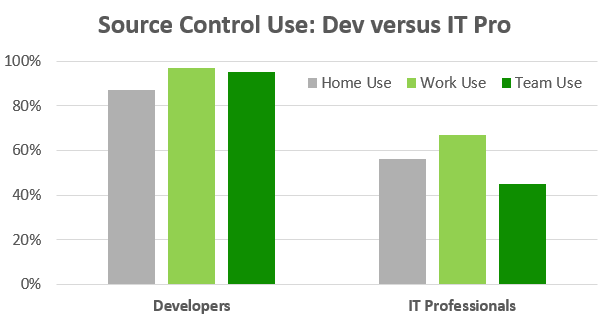
Breaking down the IT professional population by environment, we see that Microsoft environments are even further behind. Many PowerShell aficionados work on teams that aren’t using version control.
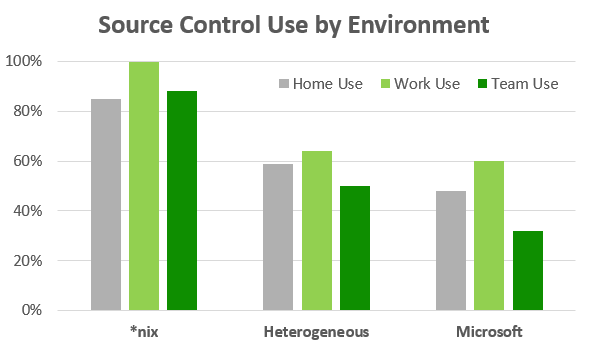
Long story short? IT professionals, management, and vendors have work to do; these new tools and ideas that rely on source control are great, but we need to work on finding a horse for the cart. The rest of my rambling analysis can be found here.
If you want to get up and running quickly, consider using GitHub for your PowerShell projects. You can start with the easy-to-use GUI client, and drop into the command line when you want to get your hands dirty. It’s a great way to start learning about source control, and to get involved in the community.
Do you have any suggestions on how we can get to a place where using source control is common place for IT professionals? Is this a worthwhile goal? Sound off in the comments!
Ever wonder what it’s like to attend PowerShell Summit? Attendee Tommy Maynard blogged about his entire experience - including the build-up anticipation prior to the event - and it’s a great set of reads. Check it out.
Join us virtually on Tuesday, May 12th at 8:30pm Central Time when PowerShell MVP Kirk Munro will present “A peek inside the Poshoholic’s toolbelt”.
It’s easy to get excited about all of the new technologies that are being talked about these days. PowerShell 5. Windows 10. Nano server. .NET Core. But none of these technologies have been released yet, and even when they are released, it will be some time before we can fully adopt them in our organizations. That’s why I like to arm my PowerShell toolbelt with impactful modules that work with current releases, so that people like you and I can work with innovative solutions for today while we keep learning about what will be available tomorrow. This session is about those modules that I use in my toolbelt every day. HistoryPx, FormatPx, DebugPx, SnippetPx, TypePx, and others. Highly impactful, innovative PowerShell solutions that you can use, right now.
**About Kirk
** Kirk Munro is a Technical Product Manager at Provance Technologies, where he is helping build the next generation of Provance’s flagship IT Asset Management product, along with several smaller products such as the ScsmPx PowerShell module and the Auto-Close Work Item MP. He is also an 8-time recipient of the Microsoft Most Valued Professional (MVP) award for his involvement in the PowerShell community. For the past 9 years, Kirk has focused almost all of his time on PowerShell and PowerShell solutions, including managing popular products such as PowerGUI, PowerWF and PowerSE. It is through this work he became known as the world’s first self-proclaimed Poshoholic. Outside of work these days Kirk is returning to his software developer roots, learning mobile technologies like Xamarin and Ruby on Rails, and taking courses on Coursera or edX whenever he can make the time to do so.
Register via EventBrite to receive the URL for this virtual meeting. Click here to be redirected to the original post of this article on the Mississippi PowerShell User Group website which contains additional information about the meeting including the system requirements to attend.
µ
Edit: The results are in.
I was watching Don and Jeffrey’s PowerShell Unplugged session from Ignite the other day, and something stood out.
At 30 minutes in, Don asked the crowd whether they were using source control. Based on the video, the crowd wasn’t big on source control.
I work in IT. If I asked that same question at work, I would likely get a similar response. Why is that? Source control is incredibly important and can drive a number of other processes, yet it seems to be an afterthought for many IT professionals.
I drafted up a quick, informal survey on source control for IT professionals. If you have a moment, would love to see your responses. Stay tuned for a rough analysis and write-up on the results [Edit: Results are in].
Cheers!
After a long hiatus, NYC Powershell User-group is back.
Tome and Sunny will be presenting 2 sessions
This is the inaugural series of Tome’s 1-year residency on Powershell Concepts (Beginner to Advanced)
Tome Tanasovski:
Concept of Objects
- Object Characterization
- Everything is an object
- Sorting, Grouping, Counting
- Where-Object and ForEach
Language Fundamentals - Operators, Variables.
- Arrays and Hashtables
- Loop structures
- Conditional Structures
- Useful rules to know.
Tome is an executive for a market-leading global financial services firm in New York City where he focuses on automation, private cloud, and distributed computing. He is the founder and leader of the New York City PowerShell User group, a blogger, and speaks regularly at conferences and user groups. In 2011 he became a cofounder of the NYC Techstravaganza, coauthored the Windows PowerShell Bible, and received the title of Honorary Scripting Guy from the Hey Scripting Guy! blog. Tome has also received the MVP award from Microsoft for the last five years in Windows PowerShell.
Blog: http://powertoe.wordpress.com
Twitter: http://twitter.com/toenuff
Sunny Chakraborty: - Large scale Application inventory using Custom MOF Files.
- Remote MSI Execution Tricks
- Invoke-Command AST
- Powershell Anonymous Functions.
Sunny is a Sr. Engineer with a global financial services firm in Philadelphia, where he focusses on Messaging, Microsoft Applications and Automation using Powershell.
GitHub: https://gist.github.com/sunnyc7
Twitter: https://twitter.com/sunnyc7
Pizza is being sponsored by SAPIEN, Makers of PowerShell Studio and Primal Script
6pm - 6:30 - Pizza and catching up
6:30 - 7:15 - Tome.
7:15 - 7:45 - Sunny.
8ish - ?? - Drinks at Beer Authority (next to Port Authority)
You must RSVP via Event Brite in order to attend:

Meeting Date:
Monday, May 11, 2015 - 18:00 - 20:00
Location
Microsoft - Times Square - 6th Floor
11 Times Square
New York, NY 10018
United States
See map: Google Maps
I had a good deal of yard work to do this weekend; I see yard work in a similar way that a click-next-admin sees Windows PowerShell. I want no part in it. So I wrote a quick bit on how we can deal with the click-next-admin.
Jeffrey Snover recently gave a TechDays Online session where he candidly asked us to “make today the last day you hire a click next admin.”
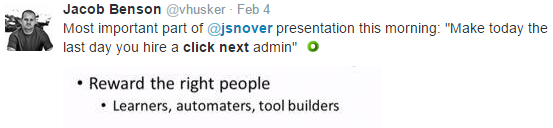
This is a fantastic goal, but how do we get there? There’s no set answer, but I listed out some of the major challenges I see.
Would love to hear your feedback and ideas - flip through the post and stop back here to discuss!
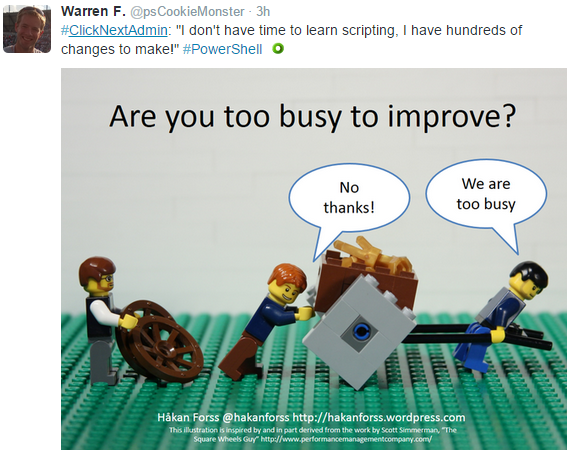
If you’d like to have some fun, share your click-next-admin stories on twitter with the #ClickNextAdmin tag.
Aside: Thank you for the invite to contribute here, it’s an honor.
Cheers!
Hey there everyone! I’m pleased to announce that PowerShell.org has a new feed on Imgur!
There was a brief and lively discussion on Twitter recently stemming from someone asking for advice on how to convince management to turn on Remoting.
“Fire Management, if they have to ask” was apparently not an option, although it should have been. I mean, at this stage, you either know the value of PowerShell and its Remoting technology, or you’re being willfully ignorant.
But that wasn’t where the discussion got lively.
Join us on Wednesday, May 6th for our second Toronto PowerShell User’s Group meeting. This time you get to take the wheel! Send us some of your PowerShell related challenges and we’ll pick the top ones to work out in a group together! We’ll also be talking about some of the things learned at PowerShell Summit – North America, and more!